 用户体系
用户体系
系统提供了 2 种类型的用户,分别满足对应的管理后台、用户 App 场景。
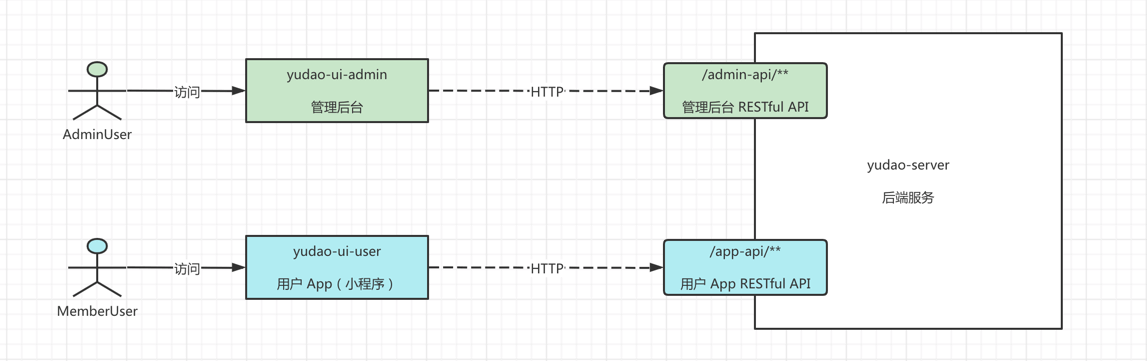
- AdminUser 管理员用户,前端访问
yudao-ui-admin-vue3(opens new window) 管理后台,后端访问/admin-api/**RESTful API 接口。 - MemberUser 会员用户,前端访问
yudao-mall-uniapp(opens new window) 用户 App,后端访问/app-api/**RESTful API 接口。
虽然是不同类型的用户,他们访问 RESTful API 接口时,都通过 Token 认证机制,具体可见 《开发指南 —— 功能权限》。
1. 表结构
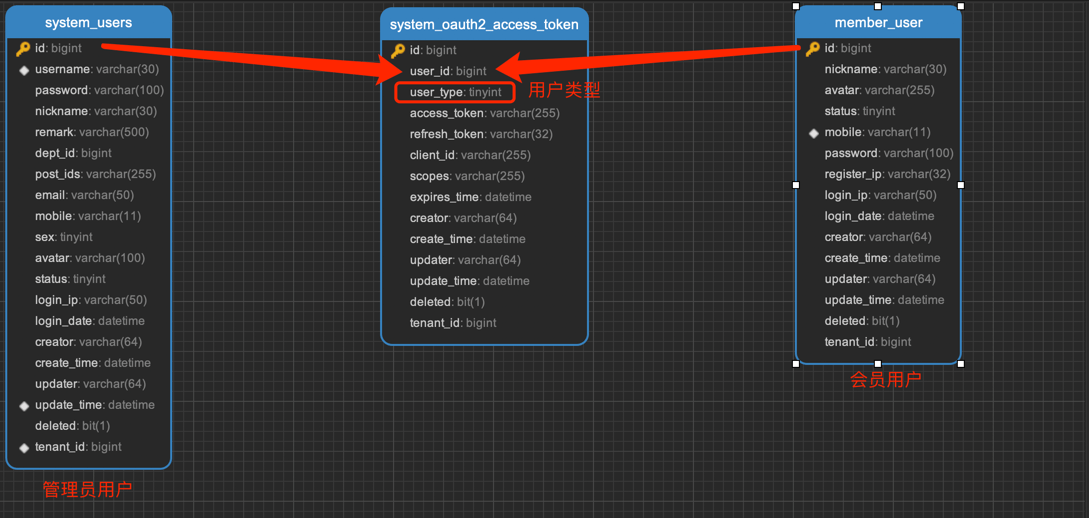
2 种类型的时候,采用不同数据库的表进行存储,管理员用户对应 system_users (opens new window) 表,会员用户对应 member_user (opens new window) 表。如下图所示:
为什么不使用统一的用户表?
确实可以采用这样的方案,新增 type 字段区分用户类型。不同用户类型的信息字段,例如说上图的 dept_id、post_ids 等等,可以增加拓展表,或者就干脆“冗余”在用户表中。
不过实际项目中,不同类型的用户往往是不同的团队维护,并且这也是绝大多团队的实践,所以我们采用了多个用户表的方案。
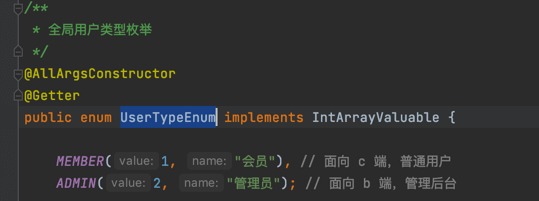
如果表需要关联多种类型的用户,例如说上述的 system_oauth2_access_token 访问令牌表,可以通过 user_type 字段进行区分。并且 user_type 对应 UserTypeEnum (opens new window) 全局枚举,代码如下:
2. 如何获取当前登录的用户?
使用 SecurityFrameworkUtils (opens new window) 提供的如下方法,可以获得当前登录用户的信息:
2.1 获取当前用户信息
public static LoginUser getLoginUser()
2.2 获取当前用户编号(最常用)
public static Long getLoginUserId()
2.3 获取当前用户昵称
public static LoginUser getLoginUserNickname()
注意,仅适合 AdminUser 管理员用户!
2.4 获取当前用户部门
public static Long getLoginUserDeptId()
注意,仅适合 AdminUser 管理员用户!
2.5 获取更多信息
① 在 OAuth2TokenServiceImpl 的 #buildUserInfo(...) 方法中,补充读取更多的用户信息,例如说 mobile、sex 等等。如下图所示:
图片纠错:最新版本引入 `yudao-module-system` 依赖即可,因为 `yudao-module-system-api` 已经合并到 `yudao-module-system` 中。
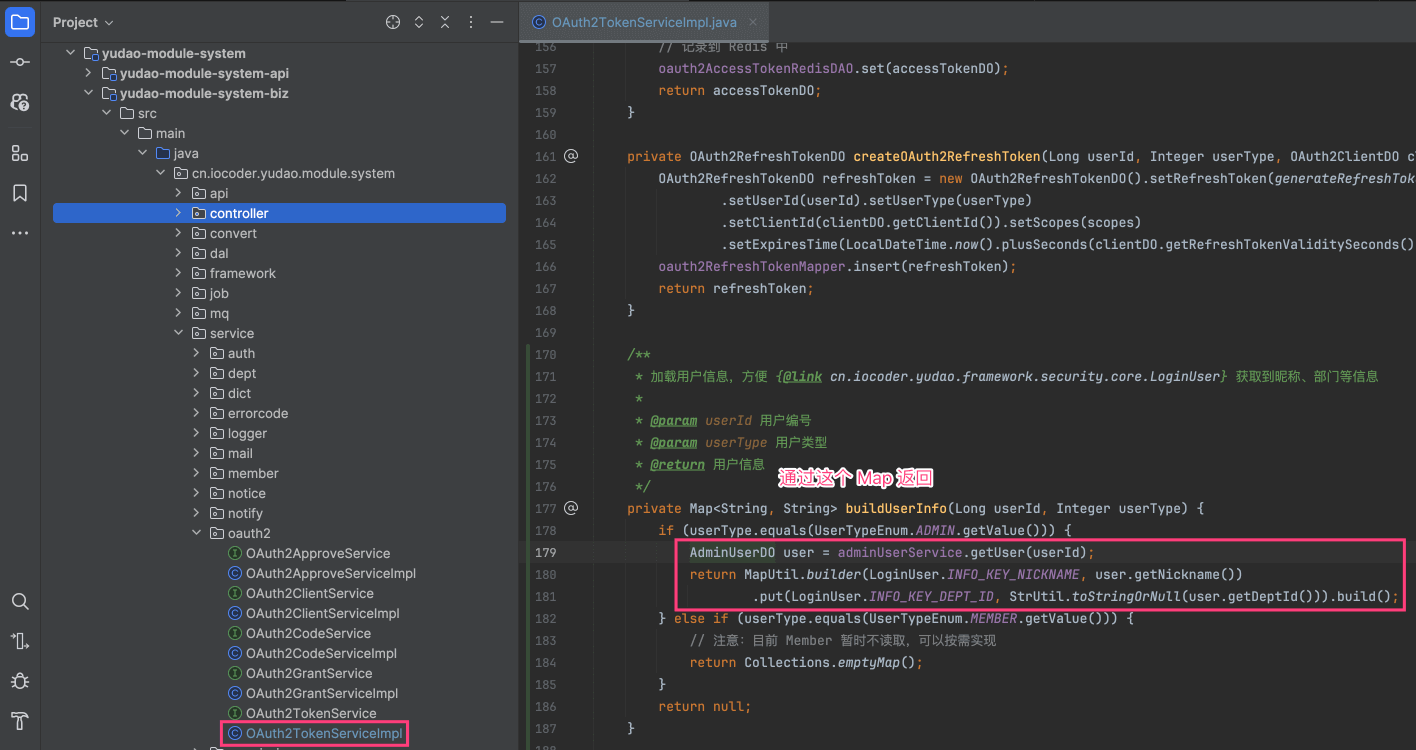
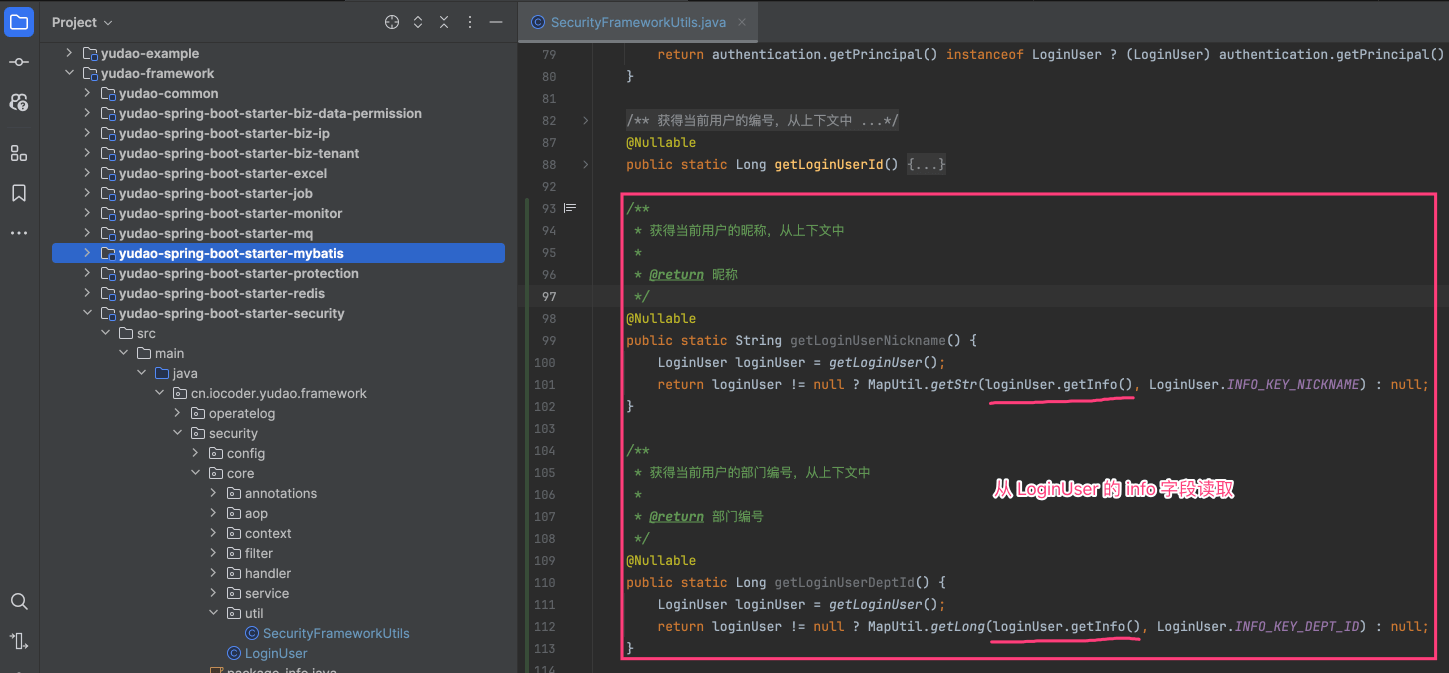
② 在 SecurityFrameworkUtils 新增对应的 getXXX() 静态方法,参考如下图所示:
3. 账号密码登录
3.1 管理后台的实现
使用 username 账号 + password 密码进行登录,由 AuthController (opens new window) 提供 /admin-api/system/auth/login 接口。代码如下:
@PostMapping("/login")
@Operation(summary = "使用账号密码登录")
public CommonResult<AuthLoginRespVO> login(@RequestBody @Valid AuthLoginReqVO reqVO) {
    String token = authService.login(reqVO, getClientIP(), getUserAgent());
    // 返回结果
    return success(AuthLoginRespVO.builder().token(token).build());
}
如何关闭验证码?
参见 《后端手册 —— 验证码》 文档。
3.2 用户 App 的实现
使用 mobile 手机 + password 密码进行登录,由 AppAuthController (opens new window) 提供 /app-api/member/auth/login 接口。代码如下:
@PostMapping("/login")
@Operation(summary = "使用手机 + 密码登录")
public CommonResult<AppAuthLoginRespVO> login(@RequestBody @Valid AppAuthLoginReqVO reqVO) {
    String token = authService.login(reqVO, getClientIP(), getUserAgent());
    // 返回结果
    return success(AppAuthLoginRespVO.builder().token(token).build());
}
4. 手机验证码登录
4.1 管理后台的实现
① 使用 mobile 手机号获得验证码,由 AuthController (opens new window) 提供 /admin-api/system/auth/send-sms-code 接口。代码如下:
@PostMapping("/send-sms-code")
@Operation(summary = "发送手机验证码")
public CommonResult<Boolean> sendSmsCode(@RequestBody @Valid AuthSendSmsReqVO reqVO) {
    authService.sendSmsCode(getLoginUserId(), reqVO);
    return success(true);
}
② 使用 mobile 手机 + code 验证码进行登录,由 AppAuthController (opens new window) 提供 /admin-api/system/auth/sms-login 接口。代码如下:
@PostMapping("/sms-login")
@Operation(summary = "使用短信验证码登录")
public CommonResult<AuthLoginRespVO> smsLogin(@RequestBody @Valid AuthSmsLoginReqVO reqVO) {
    String token = authService.smsLogin(reqVO, getClientIP(), getUserAgent());
    // 返回结果
    return success(AuthLoginRespVO.builder().token(token).build());
}
4.2 用户 App 的实现
① 使用 mobile 手机号获得验证码,由 AppAuthController (opens new window) 提供 /app-api/member/auth/send-sms-code 接口。代码如下:
@PostMapping("/send-sms-code")
@Operation(summary = "发送手机验证码")
public CommonResult<Boolean> sendSmsCode(@RequestBody @Valid AppAuthSendSmsReqVO reqVO) {
    authService.sendSmsCode(getLoginUserId(), reqVO);
    return success(true);
}
② 使用 mobile 手机 + code 验证码进行登录,由 AppAuthController (opens new window) 提供 /app-api/member/auth/sms-login 接口。代码如下:
@PostMapping("/sms-login")
@Operation(summary = "使用手机 + 验证码登录")
public CommonResult<AppAuthLoginRespVO> smsLogin(@RequestBody @Valid AppAuthSmsLoginReqVO reqVO) {
    String token = authService.smsLogin(reqVO, getClientIP(), getUserAgent());
    // 返回结果
    return success(AppAuthLoginRespVO.builder().token(token).build());
}
如果用户未注册,会自动使用手机号进行注册会员用户。所以,/app-api/member/user/sms-login 接口也提供了用户注册的功能。
5. 三方登录
详细参见 《开发指南 —— 三方登录》 文章。
5.1 管理后台的实现
① 跳转第三方平台,来获得三方授权码,由 AuthController (opens new window) 提供 /admin-api/system/auth/social-auth-redirect 接口。代码如下:
@GetMapping("/social-auth-redirect")
@Operation(summary = "社交授权的跳转")
@Parameters({
        @Parameter(name = "type", description = "社交类型", required = true),
        @Parameter(name = "redirectUri", description = "回调路径")
})
public CommonResult<String> socialAuthRedirect(@RequestParam("type") Integer type,
                                                @RequestParam("redirectUri") String redirectUri) {
    return CommonResult.success(socialUserService.getAuthorizeUrl(type, redirectUri));
}
② 使用 code 三方授权码进行快登录,由 AuthController (opens new window) 提供 /admin-api/system/auth/social-login 接口。代码如下:
@PostMapping("/social-login")
@Operation(summary = "社交快捷登录,使用 code 授权码")
public CommonResult<AuthLoginRespVO> socialQuickLogin(@RequestBody @Valid AuthSocialQuickLoginReqVO reqVO) {
    String token = authService.socialLogin(reqVO, getClientIP(), getUserAgent());
    // 返回结果
    return success(AuthLoginRespVO.builder().token(token).build());
}
③ 使用 socialCode 三方授权码 + username + password 进行绑定登录,直接使用 /admin-api/system/auth/login 账号密码登录的接口,区别在于额外带上 socialType + socialCode + socialState 参数。
5.2 用户 App 的实现
① 跳转第三方平台,来获得三方授权码,由 AppAuthController (opens new window) 提供 /app-api/member/auth/social-auth-redirect 接口。代码如下:
@GetMapping("/social-auth-redirect")
@Operation(summary = "社交授权的跳转")
@Parameters({
        @Parameter(name = "type", description = "社交类型", required = true),
        @Parameter(name = "redirectUri", description = "回调路径")
})
public CommonResult<String> socialAuthRedirect(@RequestParam("type") Integer type,
                                               @RequestParam("redirectUri") String redirectUri) {
    return CommonResult.success(socialUserService.getAuthorizeUrl(type, redirectUri));
}
② 使用 code 三方授权码进行快登录,由 AppAuthController (opens new window) 提供 /app-api/member/auth/social-login 接口。代码如下:
@PostMapping("/social-login")
@Operation(summary = "社交快捷登录,使用 code 授权码")
public CommonResult<AppAuthLoginRespVO> socialQuickLogin(@RequestBody @Valid AuthSocialQuickLoginReqVO reqVO) {
    String token = authService.socialLogin(reqVO, getClientIP(), getUserAgent());
    // 返回结果
    return success(AuthLoginRespVO.builder().token(token).build());
}
③ 使用 socialCode 三方授权码 + username + password 进行绑定登录,直接使用 /app-api/system/auth/login 手机验证码登录的接口,区别在于额外带上 socialType + socialCode + socialState 参数。
④ 【微信小程序特有】使用 phoneCode + loginCode 实现获取手机号并一键登录,由 AppAuthController (opens new window) 提供 /app-api/member/auth/weixin-mini-app-login 接口。代码如下:
@PostMapping("/weixin-mini-app-login")
@Operation(summary = "微信小程序的一键登录")
public CommonResult<AppAuthLoginRespVO> weixinMiniAppLogin(@RequestBody @Valid AppAuthWeixinMiniAppLoginReqVO reqVO) {
    return success(authService.weixinMiniAppLogin(reqVO));
}
6. 注册
6.1 管理后台的实现
管理后台暂不支持用户注册,而是通过在 [系统管理 -> 用户管理] 菜单,进行添加用户,由 UserController (opens new window) 提供 /admin-api/system/user/create 接口。代码如下:
@PostMapping("/create")
@Operation(summary = "新增用户")
@PreAuthorize("@ss.hasPermission('system:user:create')")
public CommonResult<Long> createUser(@Valid @RequestBody UserCreateReqVO reqVO) {
    Long id = userService.createUser(reqVO);
    return success(id);
}
6.2 用户 App 的实现
手机验证码登录时,如果用户未注册,会自动使用手机号进行注册会员用户。所以,/app-api/system/user/sms-login 接口也提供了用户注册的功能。
7. 用户登出
用户登出的功能,统一使用 Spring Security 框架,通过删除用户 Token 的方式来实现。代码如下:
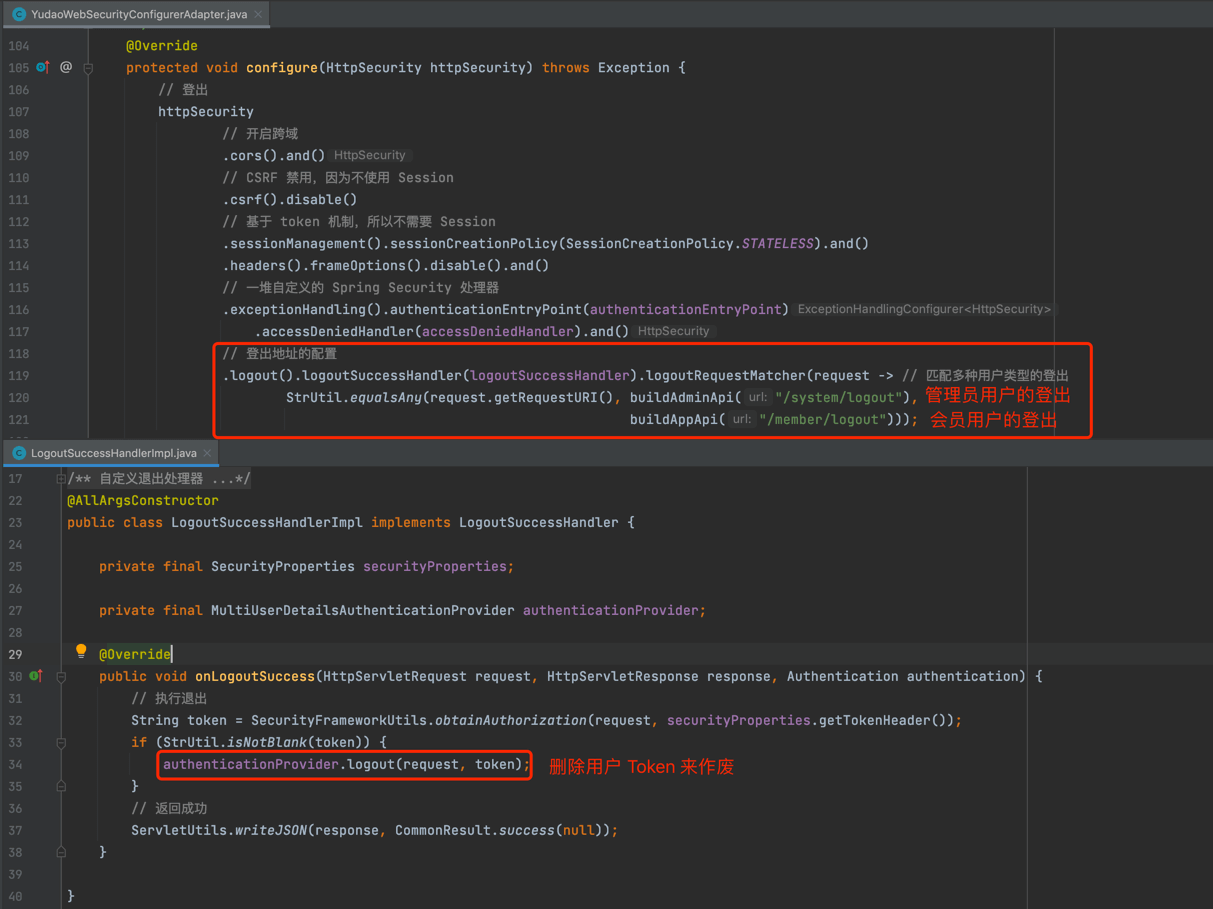
差别在于使用的 API 接口不同,管理员用户使用 /admin-api/system/logout,会员用户使用 /app-api/member/logout。